5: Design Cloud Architecture with Cost in Mind
Make design decisions at the start rather than needing to rebuild or rearchitect solutions.
Standards, Decision Trees, Playbooks
Guide people to appropriate needs. Systematic approach to resource deployments Create defined standards and enforce standards.
Playbooks guide the execution through predefined processes and templates.
Migration Strategy Costs
- Retire
- Retain
- Rehost
- Replatform
- Rearchitect
Need to take in consideration:
- Migration Speed
- Migration Complexity
- Migration Cost
- Long Term Cost
- Strategic Advantage
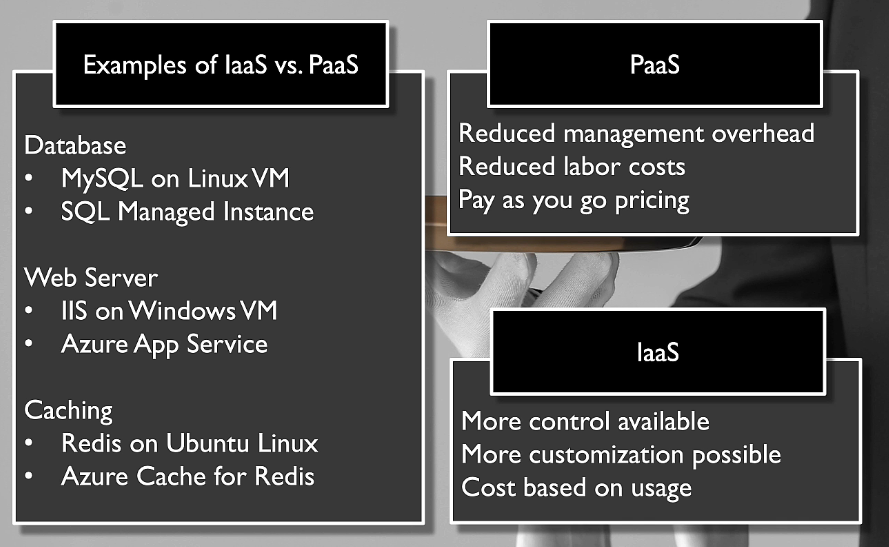
IaaS vs PaaS vs SaaS
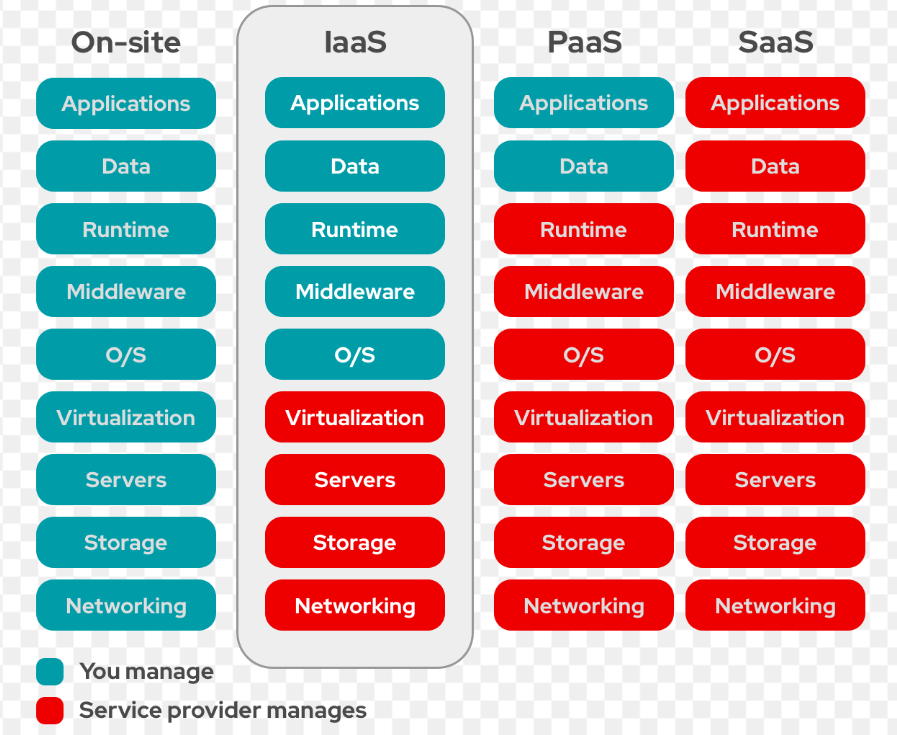
PaaS can have a higher ROI long time, but you lose customization.
Serverless
Write a function and let the server less architecture run that function
- pay per execution
- autoscaling
- reduces operational overhead
Use Cases
- Web App endpoint
- Execute upon Upload
- Run at intervals
- IoT Data
- Message Queue processing
Autoscaling
Pay for the use - when you need more performance, you then use that performance on demand.
- Vertical - larger machine size
- Horizontal - more of them behind a load balancer.
This can be a more advanced solution - need to write your app to scale up and down and trigger these autoscaling events correctly
Might not be compatible with some legacy systems.
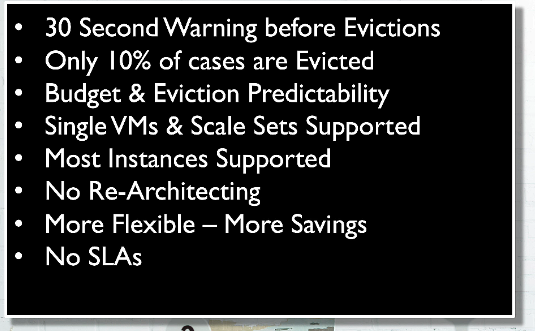
Spot instances
Reserve the overhead excess capacity for a cheaper price. Powerful for cost optimization with their limitations.
- any workload that can be interrupted
- not timebound
- restartable
- high perf compute batch
- stateless apps
Azure Reservations
Pricing model that allows you to reserve a long term capacity for a lower cost. 50-75% or more.
Exchanging reservations is important as you can then granularly assign reservations around within the reservations.
- region limitations
- sku and size limitations
Azure Advisor gives custom recommendations.
Exchange Reservations
Can exchange E series for D series Can exchange US East for UK or something
- term of the contract restarts
- must be more than the current cost.
- limited to $50,000 refund yearly
Savings Plans
Don't save as much money, but it is more flexible.
- Similar to AWS
- Limited in the services they cover.
- commit to 1 or 3 years
Azure Advisor also gives custom recommendations on these
Major benefit is that you save no matter what region, instance, etc.
Reservations vs Savings plans
Azure offers two main options for saving on compute costs: Reservations and Savings Plans. Here's a quick comparison to help you decide which one might be better for your needs:
Azure Reservations
-
Commitment: You commit to using a specific type of compute instance (e.g., a D2v4 virtual machine) in a specific Azure region for a set period (1 or 3 years).
-
Savings: You get discounts of up to 72% off the standard pay-as-you-go rate.
-
Flexibility: Reservations are less flexible since they are tied to a specific service, instance type, and region.
-
Best For: Workloads that are stable and predictable, with no anticipated changes to the instance type, instance family, or region.
Azure Savings Plans
-
Commitment: You commit to a specific hourly expenditure on eligible compute services across all Azure regions for a certain period (e.g., $5.00 per hour for 3 years).
-
Savings: Savings plans offer deep discounts and automatically apply to any compute resource within the scope of the plan.
-
Flexibility: Savings plans are more flexible and can apply to various instance families and compute services across different regions.
-
Best For: Dynamic or evolving workloads that use various instance families or compute services, or workloads running in different regions.
Azure Hybrid Benefit
What is Azure Hybrid Benefit?
Azure Hybrid Benefit allows you to use your Windows Server and SQL Server licenses with Software Assurance or qualifying subscriptions to get discounts on Azure Virtual Machines (VMs) and Azure SQL Database. This can lead to significant cost savings when migrating workloads to Azure1.
Key Benefits:
-
Windows Server VMs: Use your on-premises Windows Server licenses to get Azure VMs at the Linux rate, which is lower.
-
SQL Server VMs: Use your SQL Server licenses to get discounts on SQL Database and SQL Managed Instance.
-
Linux Subscriptions: Customers with Red Hat Enterprise Linux (RHEL) and SUSE Linux Enterprise Server (SLES) subscriptions can also benefit from discounts on Azure VMs.
-
Flexibility: Apply the benefit to new or existing VMs, and it's supported across all Azure regions.
How to Get Started:
-
Check Eligibility: Ensure you have active Software Assurance or qualifying subscription licenses.
-
Calculate Savings: Use the Azure Hybrid Benefit Savings Calculator to estimate your potential savings.
-
Apply the Benefit: When creating or managing your VMs in Azure, select the Azure Hybrid Benefit option
Dev Test Pricing
Azure Dev/Test Pricing Plans
- Pay-As-You-Go Dev/Test:
-
Ideal for teams needing isolated environments for multiple projects or teams.
-
Discounts on Windows and Windows Server VMs, Azure SQL Database, Azure Logic Apps, Azure App Service, Azure Cloud Services instances, and Azure HDInsight instances.
-
Discounts are available as long as you maintain your Visual Studio subscription.
-
- Enterprise Dev/Test:
-
For Enterprise Agreement customers.
-
Special lower rates on Windows VMs, Cloud Services, SQL Database, SQL Managed Instance, HDInsight, App Service, and Logic Apps.
-
Use funds already in your Enterprise Agreement, no separate payment required.
-
- Azure Plan for Dev/Test:
-
For Microsoft Customer Agreement customers.
-
Lower rates on dev/test workloads.
-
Key Benefits:
-
Significant Cost Savings: Save up to 57% on typical web app dev/test environments.
-
Flexibility: Manage both dev/test and production subscriptions within the Azure account portal.
-
Access to Dev/Test Images: Use images in the Azure shared image gallery.
Azure Policy
Guardrails around cost
- set limits on the types of resources - NO LARGE VMs
- multi-region geo replication disabled.
- allowed locations
- tagging enforcement
A powerful tool for enforcing governance and compliance across your Azure environment, and it can also play a significant role in cost optimization. Here are some ways you can use Azure Policy to help manage and reduce your cloud costs:
1. Enforce Resource Policies
-
Prevent Unnecessary Resource Creation: Use Azure Policy to block the deployment of resources that are not compliant with your cost management policies. For example, you can prevent the creation of underutilized or idle resources2.
-
Apply Resource Tags: Ensure that all resources are tagged correctly, which helps in tracking and managing costs more effectively.
2. Implement Cost Management Controls
-
Budgets and Alerts: Set budgets and configure alerts to monitor spending and get notified when costs exceed predefined thresholds.
-
Resource Limits: Define limits on the number of resources that can be deployed, ensuring that you don't exceed your budget.
3. Optimize Resource Usage
-
Right-Size Resources: Use Azure Policy to enforce recommendations from Azure Advisor, such as resizing underutilized VMs or shutting down idle resources.
-
Automate Resource Deletion: Automatically delete resources that are no longer needed or have been idle for a certain period.
4. Monitor and Report
-
Cost Reporting: Generate detailed cost reports to understand where your money is going and identify areas for improvement.
-
Compliance Reporting: Ensure that all resources comply with your cost optimization policies and report on compliance status.
By leveraging Azure Policy for cost optimization, you can enforce best practices, prevent unnecessary spending, and ensure that your Azure environment is both efficient and cost-effective.